
How to Turn Amazon's Title Change Into a Listing Upgrade




If you read our first piece on Amazon's new 75-character title limit, you already know what is happening and why it matters. What most brands are still figuring out is how to turn that knowledge into action before July 27, and in what order.
Five Questions That Matter More Than the Character Count
The instinct when Amazon changes a core listing rule is to solve the surface problem and miss the deeper one. Before moving into strategy, there are five questions worth answering clearly, because getting them wrong early makes the rest of the work harder.
What exactly counts toward 75 characters?
Everything. Spaces, punctuation, brand names, size or color variant designators, compatibility terms, all of it counts against the 75-character limit. There are no exceptions within the field.
This matters immediately if your brand name is long. A brand name that runs 18 characters leaves 57 characters for everything else. A primary keyword, a differentiator, and a size designation get tight quickly. That is not a reason to remove your brand from the title. Amazon's best practice is brand first, and that convention still holds. It is a reason to think carefully about every word that follows.
The practical implication: before you start rewriting, count your brand name. That number is your fixed cost. Whatever strategy you apply, it starts from what is left.
What happens if I do nothing?
Your listings stay active. Amazon will not suppress your listing or pull it from search results because the title is over 75 characters. After July 27, over-limit titles will be gradually updated to Amazon's AI recommendation, and you will have 14 days to review, modify, and approve the AI-generated version before it publishes.
The immediate risk is not visibility loss. The risk is loss of editorial control over your most important ranking field. If Amazon rewrites your title and the AI version does not preserve the keyword structure you built, you will need to go back in and correct it, which means reversing a change rather than making one. That is a harder starting position than acting first.
Where do the missing details go?
The keywords and product information that no longer fit in a 75-character title have two destinations.
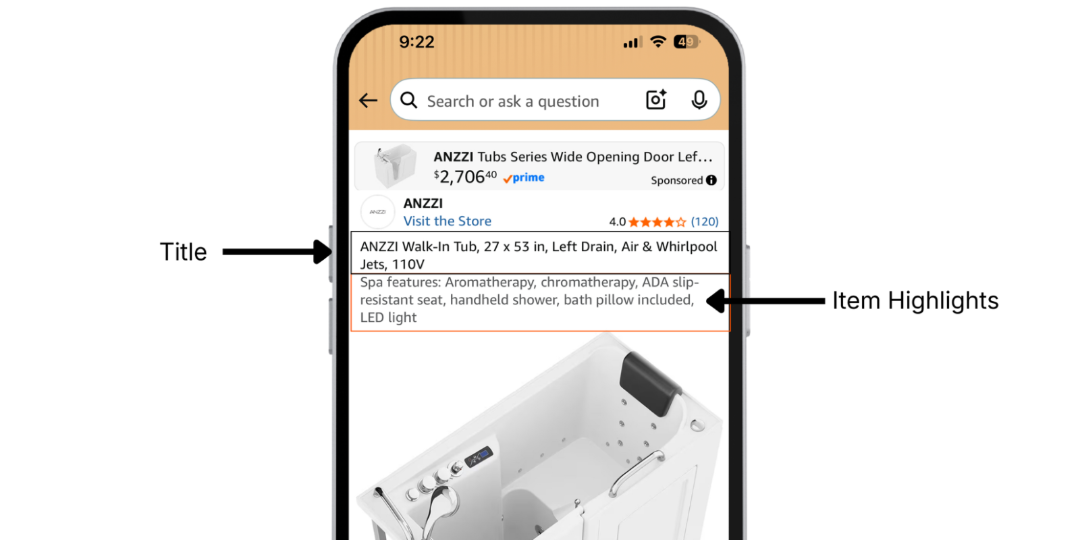
The first is Item Highlights. This 125-character field is searchable and visible to shoppers in both search results and on the product detail page. On mobile, it renders in gray text below the title. On desktop, Amazon currently displays it after a pipe character following the title. Secondary keywords, use cases, materials, size and format details, compatibility claims: these belong in Item Highlights, chosen with the same data discipline you apply to the title.
The second is your backend generic keyword field. This field is not visible to shoppers but is indexed by Amazon. It is the right place for additional keyword variants, alternate phrasings, and long-tail terms that would not naturally appear in readable front-end copy. If you have not reviewed your backend field recently, it is worth checking. It is one of the most underused fields in most catalogs, and the gap between what is there and what could be there is often significant.
No indexable space is going away. What is changing is the structure. Details that used to live in the back half of a 160-character title now live in Item Highlights and the backend keyword field instead. The total surface area for discoverability is the same. The decisions about what goes where just require more intentionality.
Should I trust Amazon's AI-generated rewrite?
At best, Amazon's AI-generated version will be formatted correctly. It will hit the 75-character limit, follow capitalization conventions, and avoid obvious formatting errors. What it will not do is start from your conversion data.
From what we have seen so far across the brands we manage, Amazon's AI generates rewrites from your existing title content, your bullet points, and its own relevance model. If your current title had formatting inconsistencies, the AI tends to carry those forward rather than correcting them. If your highest-converting search terms happened to live in the section of your title that gets cut, they may not survive. If your title was built around keyword combinations you tested and refined over time, the AI has no way of knowing which combinations matter and which do not.
The AI solves a compliance problem. It does not solve a performance optimization problem. That distinction is where the real risk sits.
Does my brand name still belong at the front?
Yes. Amazon's current best practice places the brand name in the first position of the title, and that guidance has not changed with the new limit. In fact, the logic is stronger now. The first 75 characters are the only part of the title a mobile shopper sees before deciding whether to click. Brand placement at the front protects branded search and ensures the product is immediately attributable to the right brand in a crowded search result.
The constraint is real: if your brand name is long, it reduces the remaining space for keywords. The answer is not to drop the brand. The answer is to be more precise about every word that follows it.
The Data You Already Have and Are Not Using
Here is where most brands miss the bigger opportunity.
Every day your PPC campaigns run, they generate conversion intelligence. Your Search Query Performance (SQP) report captures which search terms drove impressions, which drove clicks, which drove add to carts, and which drove purchases, across both paid and organic traffic, at the individual ASIN level. That is the primary signal. Your campaign performance data sits alongside it, adding a layer of cost and efficiency intelligence: which keywords converted profitably, which drained spend without driving sales, which are trending in the right direction.
Now think about your listings. When were your titles last updated? If you are being honest, the answer is probably at launch, or close to it. If you have been treating listings as a one-time project, you are not alone. But the data has kept flowing while the listings stayed frozen.
This is the disconnect that the 75-character limit exposes. At 200 characters, you could cover your bases with a wide enough spread of keywords that enough of them landed without knowing precisely which ones mattered most. At 75 characters, that approach does not work. You do not have room to cover your bases. You have room for the words that count.
The only way to know which words count is to look at the data you have been generating every day and not using.
If you want to see what that disconnect looks like in a real catalog, and what closing it actually produced, read how Green Sprouts turned a stalled listing into a 10% sales increase and a 15% conversion rate improvement.
What a Data-Driven Decision Actually Looks Like in 75 Characters
This is where the process gets concrete, and where the difficulty becomes clear.
Start with an audit, not a rewrite. Before you change anything, pull your SQP data, your campaign keyword reports, and your conversion performance by search term. For every keyword currently in your title, ask one question: is this term driving purchases, or is it just taking up space? For a catalog of dozens or hundreds of ASINs, that audit alone is a significant undertaking.
Prioritize by conversion weight, not search volume. Generic keyword tools tell you what the category searches for. Your SQP tells you what converts for your specific product. Those are different lists. The keyword with the highest search volume is not always the keyword that belongs in your first 75 characters. The keyword with the strongest conversion rate for your ASIN is.
To make this concrete: a title like "BrandName Insulated Stainless Steel Water Bottle 32oz" runs 51 characters. That leaves 24 characters for a differentiator. "Leak-Proof Lid, BPA-Free" runs 23 characters. That title just fits. Remove the differentiator, and you have room for a secondary keyword instead. Add a compatibility term, and something else must go. There is no version of this that is not a deliberate trade-off, and the right trade-off depends entirely on your conversion data.
Treat Item Highlights as a strategy, not an overflow bin. The keywords and details that do not fit in the title do not disappear. They move to Item Highlights, where they remain searchable and visible. But the same data discipline applies. Item Highlights populated from SQP data carry more indexing value than Item Highlights populated from instinct.
Do not forget the backend keyword field. Hidden from shoppers but indexed by Amazon, this is the right place for long-tail variants, alternate phrasings, and terms that do not belong in readable copy. It is also one of the most underused fields in most catalogs. Getting it right requires the same approach as the title: start from what your data says converts, not from what sounds comprehensive.
And then do it again. Shopper behavior on Amazon shifts continuously. New competitors enter. Seasonal terms rotate in and out. The keyword that drove your highest conversion in Q1 may be weaker by Q3. If you treat July 27 as a one-time fix, you will be back in the same position six months from now, just with a shorter title.
Why Your Own Data Is the Right Starting Point, and Why Scale Makes It Hard
The most valuable keyword intelligence you have is not in a third-party tool. It is in your Search Query Performance report.
Generic keyword research tools show you the category. They cannot tell you whether "stainless steel water bottle" converts at a profitable rate for your specific product, in your specific competitive set, at your current price point. They do not know that "insulated water bottle for hiking" drives your purchases at twice the conversion rate of the broader head term. Your SQP data knows all of that.
Where advertising data comes in is as an accelerant. SQP captures full-funnel shopper behavior at the ASIN level. Campaign performance adds the cost and efficiency layer: what converts profitably, what drains spend, what is trending. Together they give you a more complete picture than either source alone. Listings optimized against both improve faster and hold their performance longer.
The challenge is not the insight. It is the execution at scale. Translating that data into listing decisions across a full catalog, applying it consistently across titles, Item Highlights, and backend keywords, and repeating the process as search behavior shifts is where most teams run out of bandwidth. Bulk flat-file editing can get the formatting right. It cannot tell you which keywords belong there. That decision requires the data, and acting on it continuously across every ASIN that matters is the hard part.
This is exactly the gap that Quartile's SEO and Listing Optimization is built to close. If you want to see where your listings stand before July 27, request a listing audit.
How to Come Out Ahead
Mobile shoppers and Alexa Shopping are looking for the same thing from your listing: a precise, structured answer to the question of what your product is and why it matches what they are looking for. The brands that use July 27 as a forcing function to build that kind of listing structure will come out ahead of every competitor treating it as a formatting task.
The distinction between those two outcomes is not budget or team size. It is whether your listing decisions are connected to your conversion data.
With that connection, you identify exactly which words belong in 75 characters because you have evidence. You build Item Highlights that support the title rather than just holding the overflow. You update continuously as search behavior shifts. And because your listings are aligned to what converts, you earn better click-through rates, better conversion rates, and better organic rank over time.
Better organic rank drives more organic traffic. More organic traffic compounds the conversion signals that determine where Amazon places your listing next. And because better-indexed listings deliver more relevant traffic to your ads, your cost per click drops as Amazon registers stronger conversion performance. The whole system becomes more productive, not from more advertising spend, but from better foundations.
Without that connection, you will get the formatting right. You are unlikely to get the keyword prioritization right in a way that compounds over time. And six months from now, when search behavior has shifted and your listings have not, you will be back at step one.
Start Here
If you want to know where your listings stand before July 27, the most useful first step is understanding what your conversion data says about the keywords currently in your titles. From there, the decisions become clearer and faster.
Request a listing audit. Our team will identify where the biggest gaps are across your catalog before the deadline and show you what a data-driven approach to the 75-character title looks like for your specific products.
Want a deeper walkthrough? Join our webinar on SEO and listing optimization on July 8th, where we cover the Amazon ranking engine, the data disconnect you may be sitting with, and what continuous optimization looks like in practice.